
Ethscription details
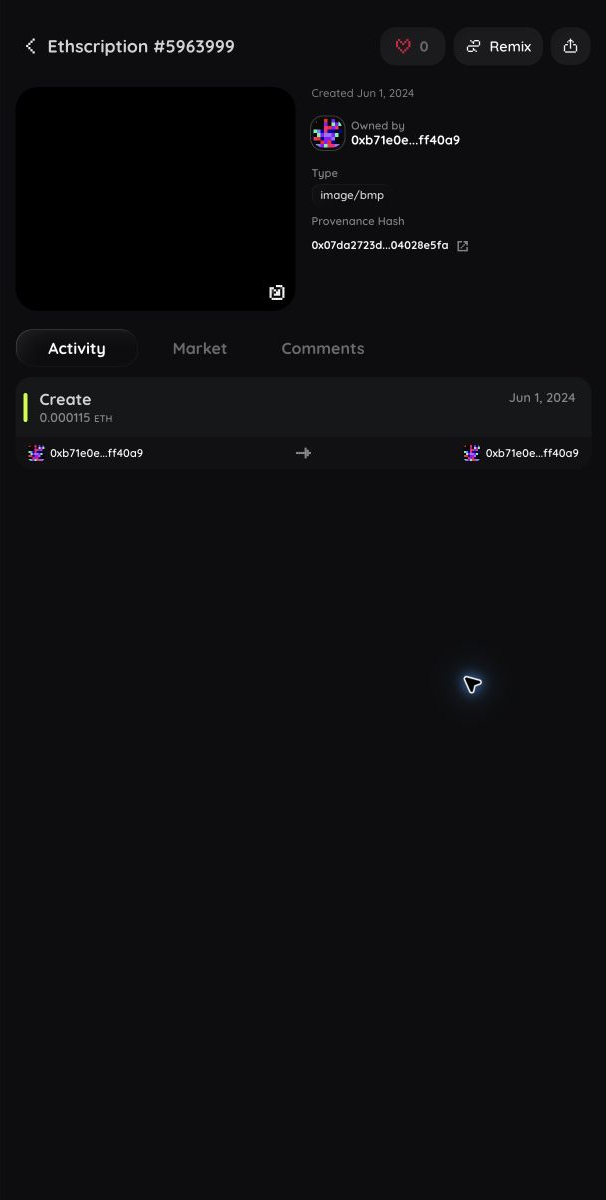
The detail page is the complete view of one Ethscription. Use it to verify the item before you like, remix, share, list, buy, transfer, or comment.
Before you start
- Guests can inspect public content and history.
- A verified wallet is required for likes, comments, listings, purchases, and transfers.
- Comments, replies, deletes, listings, purchases, and transfers are Ethereum transactions. Review the wallet prompt and gas before approval.
- Controls appear only when the item, account role, ownership state, and marketplace support the action.
Open an Ethscription
Select an item from Home, Recent, Market, a collection, a profile, Inbox, or Search. The page opens with the content and ownership summary first, followed by Activity, Market, Attributes when available, and Comments.
Confirm the item by comparing its name or Ethscription number and creation transaction hash with the link or transaction you intended to open.
Inspect the content
- Review the media or formatted content.
- Select the content or fullscreen control to enlarge it.
- Select it again to leave fullscreen.
- Check the content type if the preview is unexpected.
Images, video, audio, JSON, text, HTML, and supported token content use different viewers. HTML is user-generated and may be interactive. Never enter passwords, payment details, seed phrases, or private keys into an Ethscription.
If a preview fails, the Ethscription can still exist. Use the content type and creation transaction hash to verify it in Etherscan.
Verify the owner and creation transaction
The information beside the content shows:
- Creation date
- Current owner, or the owner and contract when escrowed
- File or content type
- Creation transaction hash
- Collection and item name when available
Select the shortened creation transaction hash to copy it. Select the external-link icon to open the transaction in Etherscan.
Review activity
- Choose Activity.
- Review creation, transfer, sale, listing, bid, auction, and escrow events in time order.
- Select an actor or recipient to open that public profile.
- Use a transaction link when available to verify the event on Ethereum.
Activity can take a short time to update after a transaction confirms.
Review or use the market panel
- Choose Market.
- Wait for the listing and ownership check to finish.
- Review the marketplace, seller, price, buyer restriction, and fee information shown.
- Use only the control that matches your intended action.
An eligible buyer can select Buy on a supported listing. The owner of an eligible item can use floored Market controls to send it to escrow, list it, update it, cancel the listing, or remove it from escrow. See Market listings for the complete transaction sequence.
No current floored page provides auction creation, bid, or settlement controls. You can browse auction cards from Market > Auctions.
Review attributes
Choose Attributes to view collection traits. This tab appears only when floored has traits for the item. Use the collection link to compare it with other items that share a trait.
Like an Ethscription
- Select the heart in the page header.
- Verify your wallet if floored asks you to sign in.
A filled heart means your like is active. Select it again to unlike. Select a non-zero like count when available to see who liked the item.
Add a comment or reply
- Choose Comments.
- Enter text in Leave a comment.
- Select Add comment.
- Review and approve the wallet transaction and gas.
- Wait for Transaction complete.
Your comment appears after the transaction confirms and floored processes it. To reply, select reply, enter the response, select Add comment, and approve a separate transaction.
To delete your own comment, select delete and approve the deletion transaction. The comment becomes [deleted] so existing replies keep their place. You cannot currently share an individual comment from its menu.
Remix compatible content
- Select Remix in the header.
- Wait for Create to open with the compatible content loaded.
- Edit the new draft without changing the original Ethscription.
Remix is hidden when the content cannot be opened by the current creator tools. See Creator studio and Pixel art studio.
Share the Ethscription
- Select the share icon in the header.
- Choose Copy link, X, Telegram, or an available system share option.
- Look for Link copied to clipboard when using Copy link.
The public link opens this detail page. Sharing does not grant wallet or account access.
Transfer an owned item
- Select the transfer icon in the header.
- Enter a complete Ethereum address or ENS name.
- Confirm the resolved address.
- Select Send and approve the wallet transaction.
The transfer icon appears only when floored identifies the connected account as the current transferable owner. See Transfers for confirmation and recovery steps.
If a control is missing
- Like and comment actions require a verified wallet.
- Transfer appears only for the current transferable owner.
- Attributes appears only when the item has collection traits.
- Remix appears only for compatible content.
- Buy and seller controls depend on marketplace support and verified ownership.
- Ordinary owner actions are unavailable while the item is held in marketplace escrow.
- Auction transaction controls are not currently available from the detail page.
Pull down on a touch device to refresh processed activity, ownership, comments, and market state. See Troubleshooting if a confirmed transaction remains missing.