
Buy and sell Ethscriptions
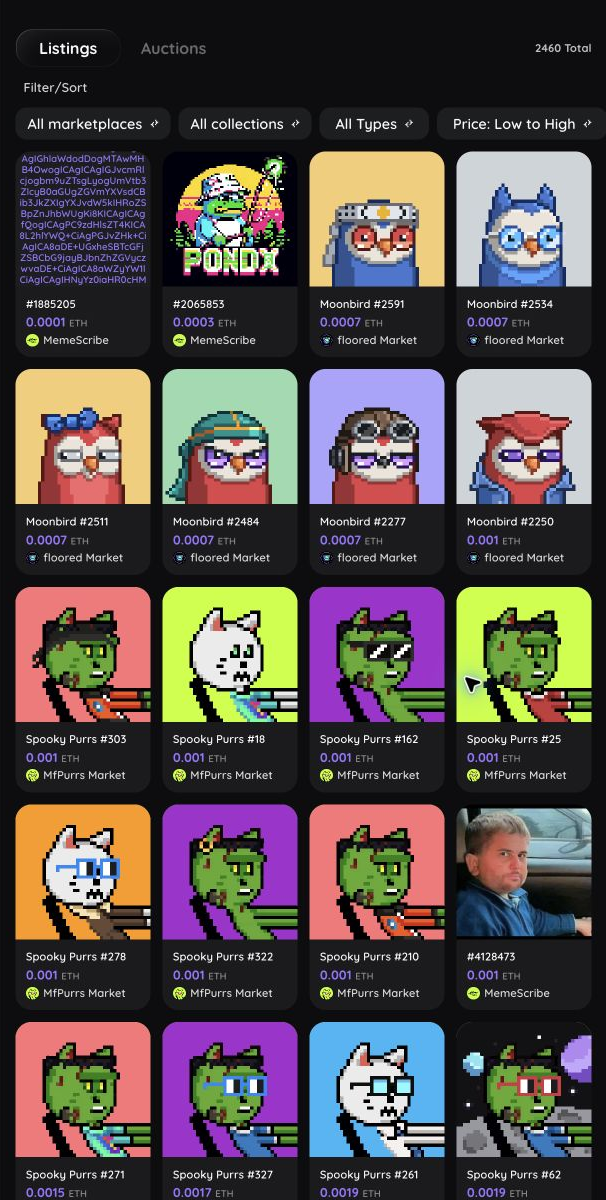
Use Market to browse Ethscriptions for sale. You can buy from several marketplaces inside floored, but you can create and manage listings only through floored Market.
Before you start
You can browse without signing in. To buy or sell, connect and verify a wallet. You also need enough ETH for the price and network fees.
The actions you see depend on the marketplace, the listing, and whether your wallet owns the Ethscription.
Find an Ethscription to buy
- Open Market.
- Keep Listings selected.
- Open Filter/Sort to narrow results by marketplace, collection, collection trait, content type, price, or listing date.
- Select a listing to open its Ethscription page.
- Review the seller, price, marketplace, ownership, and listing status before buying.
If no listings appear, clear the filters or choose a different collection or marketplace.
Buy a listed Ethscription
When a marketplace supports buying inside floored:
- Open the listed Ethscription.
- Open its Market section.
- Confirm the marketplace, seller, price, and any private-buyer restriction.
- Choose Buy.
- In your wallet, compare the contract and ETH value with the details shown in floored.
- Approve the transaction and wait for confirmation.
The Ethscription may not appear in your profile immediately after Ethereum confirms. Pull to refresh or return later while floored refreshes its ownership and listing information.
List an Ethscription on floored Market
If the Ethscription is still in your wallet, floored offers two paths:
- List for sale: Sends the Ethscription to floored Market escrow and creates the listing in one wallet transaction.
- Send to escrow: Moves the Ethscription to floored Market without listing it. After that transaction confirms, you set the price and choose List for sale in a second wallet transaction.
If the Ethscription is already in floored Market escrow under your account, List for sale creates the listing in one wallet transaction.
- Open an Ethscription you own.
- Open its Market section.
- Enter the price in ETH.
- Choose a public or private listing.
- For a private listing, enter and verify the buyer's full address or ENS name.
- Review the marketplace fee information.
- Choose List for sale, or List for sale privately when a private buyer is set, to deposit and list in one transaction.
- Review the escrow destination, price, and private buyer when applicable, then approve the wallet transaction.
- Wait for the listing to appear as active.
If you choose Send to escrow instead, wait for that transaction to confirm, return to the Market section, enter the listing details, then choose List for sale. An escrowed Ethscription is not for sale until the listing transaction confirms.
For a private listing, the final button reads List for sale privately after you enter a valid buyer address.
Manage your floored Market listing
Open the Ethscription and its Market section. Depending on the listing state, you can:
- Update listing: Enter the new price or private-buyer choice, then select Update listing and approve the transaction.
- Cancel listing: Stop the sale but leave the Ethscription in floored Market escrow.
- Remove from escrow: Cancel any active listing and return the Ethscription to your wallet in one transaction.
- List for sale: Create a new listing for an unlisted Ethscription that remains in your escrow account.
If you cancel first, you still need Remove from escrow to return the item. You do not need to cancel before removing it from escrow.
Wait through the escrow cooldown
After an Ethscription enters floored Market escrow, the contract waits five Ethereum blocks before it can be bought or removed. If a purchase or Remove from escrow fails soon after deposit, wait for the full five-block cooldown, refresh the item, and try once more. Do not keep submitting the same action while the cooldown is active.
Withdraw sale proceeds
When floored Market proceeds are ready to withdraw, a notice appears in the mobile or desktop navigation.
- Select the proceeds notice.
- Review the amount and contract in the wallet prompt.
- Approve the withdrawal.
- Wait for the transaction to confirm.
The ETH remains in the marketplace contract until the withdrawal confirms.
What each marketplace supports
| Marketplace | View activity | Browse listings | Buy in floored | Sell in floored |
|---|---|---|---|---|
| floored Market | Yes | Yes | Yes | Yes |
| MemeScribe | Yes | Yes | Yes | No |
| EtherPhunks Market | Yes | Yes | Yes | No |
| MfPurrs Market | Yes | Yes | Yes | No |
| Etch Market | Yes | No | No | No |
| Ordex Market | Yes | No | No | No |
| QuantumPhunks Market | Yes | No | No | No |
| Ittybits Market | Yes | No | No | No |
| Ethscriptions.com | Yes | No | No | No |
If an action is missing, that marketplace does not offer it through floored.
Escrow and fees
Escrow means a marketplace contract holds the Ethscription while a market action is active. Buying transfers it from the contract to the buyer. Cancel listing leaves it in escrow. Remove from escrow cancels any active listing and returns the item in one transaction.
The buyer pays the displayed listing price plus the wallet's estimated network fee. The listing panel explains the current marketplace fee before you approve anything.
If an action is unavailable
- Confirm that the connected wallet is verified.
- Confirm that the wallet owns the Ethscription.
- Check whether the Ethscription is already in escrow.
- If the item entered escrow recently, wait for the five-block cooldown before buying or removing it.
- Check the marketplace support table above.
- Refresh if a recent transaction has confirmed but the page has not updated.
For more help, see Troubleshooting and Fees and confirmations.