
Settings
Open Settings from your profile controls. Settings save as soon as you change them, so there is no separate Save button. Changes apply to the current app or account as described below.
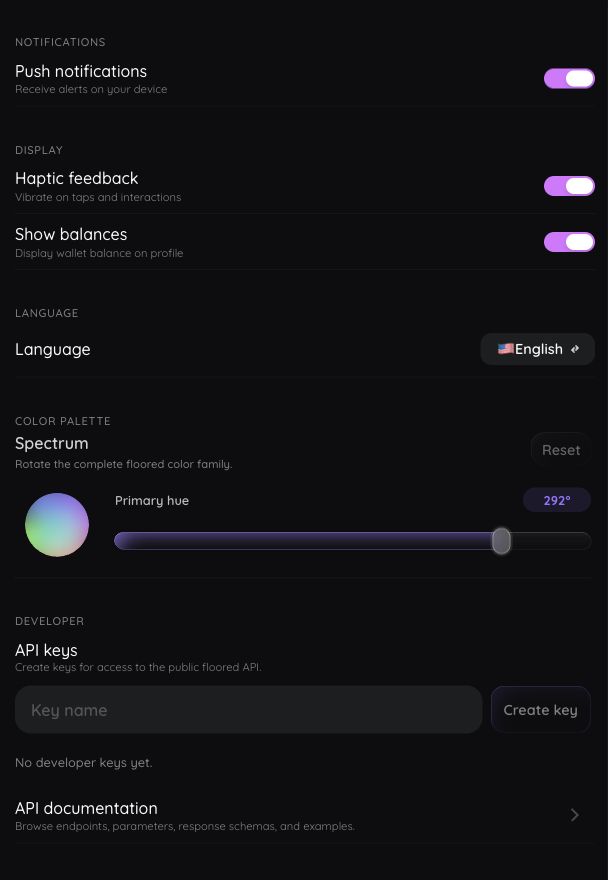
Turn push notifications on or off
Use Push notifications to register or unregister this device for supported alerts.
Your browser or operating system must also allow notifications. If you previously denied permission, enable it in your device settings before turning the floored setting on again.
Turn haptic feedback on or off
Use Haptic feedback to control supported vibration or tactile feedback for taps and interactions. Haptics require a compatible device and may be limited in a browser.
Show or hide your wallet balance
Use Show balances to control whether your wallet balance appears in the profile summary. This setting does not change the balance or hide public blockchain information.
Change language
Choose one of the available interface languages:
- English
- Simplified Chinese
- Japanese
- Spanish
- French
- Hindi
This changes supported floored interface text. It does not translate user-created Ethscriptions, profiles, collection information, or messages.
Change interface colors
Use the palette control to choose the main hue for the floored interface. The related interface colors update together so labels and status colors remain consistent.
Choose Reset to restore the default colors.
Manage developer API keys
Eligible Premium or Admin accounts can create named keys for the read-only public API.
- Find Developer and API keys.
- Enter a descriptive name.
- Choose Create key.
- Copy the raw key before choosing Done. It appears only once.
Existing keys show their status, last use, and recent usage. Revoking a key is permanent. If premium eligibility ends, existing keys remain visible but cannot authenticate until eligibility returns.
See Public API for authentication, endpoints, limits, and examples.
Check the version and legal information
The Settings footer shows the installed floored version and release status. It also links to the Terms of Service and Privacy Policy.